ℹ️ What will you do and learn in this chapter?
- The feature to enable through feature-flag
- The implied pieces of code
The new Discount feature
Purpose
The purpose of this feature is to apply a 10% discount on instruments. This allows you to test pricing changes, promotions, or A/B test a new pricing strategy without committing to permanent database changes.
It consists of two parts:
- Backend: Applying the actual discount logic to the prices returned by the API.
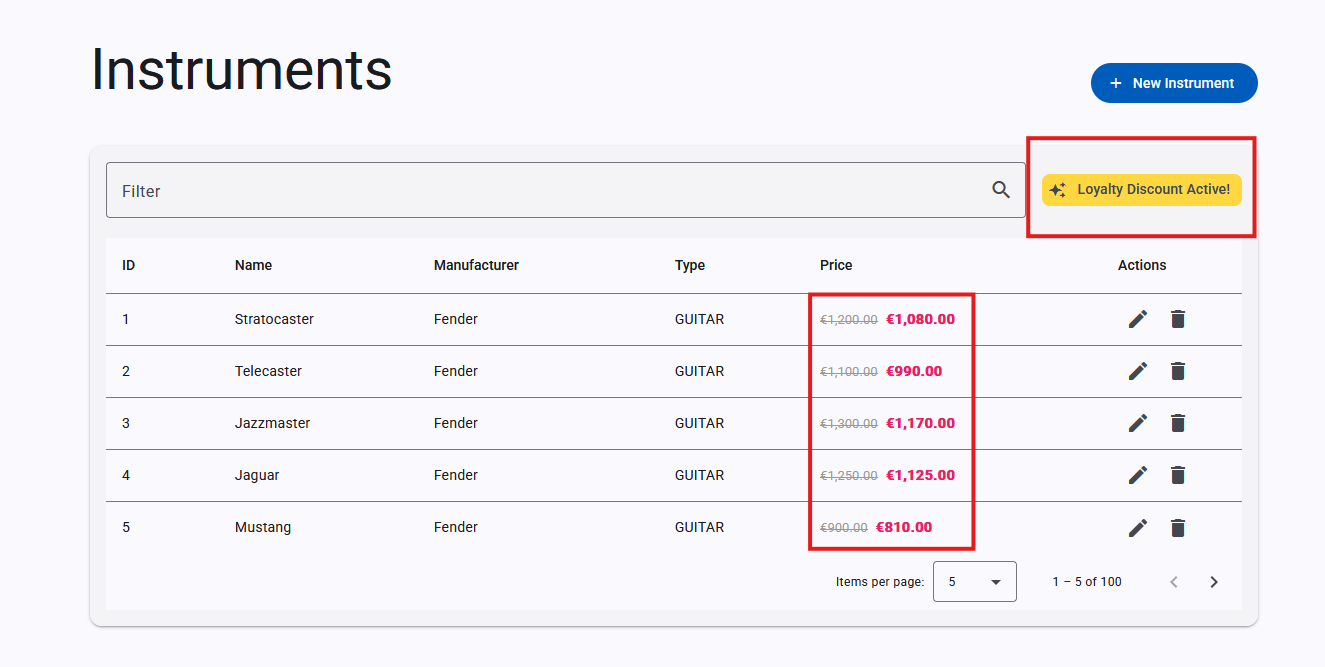
- Frontend (GUI): Displaying a promotional banner and striking out the original price in favor of the discounted price.
How is it implemented so far?
In the API
The discount logic is currently centralized in the backend through the DiscountPort interface. The adapter DiscountAdapter implements this behavior.
Currently, it has a hardcoded variable (manualDiscount) set to false, effectively bypassing the discount logic and returning the instrument with its original price.
// DiscountAdapter.java
boolean manualDiscount = false; // Toggle to true to test UI
if (manualDiscount) {
    double originalPrice = instrument.price();
    double discountedPrice = originalPrice * 0.9; // 10% discount
    return Result.success(instrument.withDiscount(discountedPrice, originalPrice));
}

return Result.success(instrument);
When activated, it sets the discounted price to originalPrice * 0.9 and stores the original price in the originalPrice field of the returned instrument by utilizing the instrument.withDiscount() method.
The InstrumentResource handles retrieving the user contextual information via the User HTTP Header. It then delegates the logic to InstrumentService.applyDiscount(Instrument, User) before returning any results to the client.
The sequence diagram
In the GUI
The frontend implementation is located in the InstrumentListComponent (gui/src/app/pages/instruments/instrument-list/instrument-list.component.ts).
It uses an Angular signal called showDiscountBanner to determine whether the promotional UI elements should be displayed.
// instrument-list.component.ts
showDiscountBanner = signal(false);

private async initFeatureFlags() {
  // TODO: Implement OpenFeature initialization

  // For now, manually toggle or keep false
  this.showDiscountBanner.set(true); // Manually hardcoded to true for now
}
If showDiscountBanner is true, the UI displays a "Loyalty Discount Active!" banner. For instruments that have a discount (row.hasDiscount), it shows the original price crossed out alongside the new discounted price.
@if (row.hasDiscount && showDiscountBanner()) {
  <span class="original-price">{{ row.originalPrice | currency:'EUR' }}</span>
  <span class="discounted-price">{{ row.price | currency:'EUR' }}</span>
} @else {
  {{ row.price | currency:'EUR' }}
}
Test it "manually"
To test the discount behavior manually:
1. Enable the Backend discount:
- 📝Check that it's actually working. Run
./mvnw quarkus:devin theapifolder otherwise. - 📝 Open
api/src/main/java/info/touret/musicstore/infrastructure/featureflag/adapter/DiscountAdapter.java - 🛠️ Change
boolean manualDiscount = false;toboolean manualDiscount = true;. - 👀 Observe the live-reload happening in your Quarkus console.
2. Enable the Frontend UI banner:
- 📝Check that it's actually working. Run
npm startin theguifolder otherwise. - 📝 Open
gui/src/app/pages/instruments/instrument-list/instrument-list.component.ts - 🛠️ Ensure
this.showDiscountBanner.set(true);is present and set totrueinsideinitFeatureFlags(). - 👀 Wait for the Angular dev server to recompile.
✅ Validate it by checking the Web UI:
- Open the Music Store Manager GUI in your browser.
- You should see the "Loyalty Discount Active!" banner at the top of the instruments list.
- The prices in the table should show the original price crossed out and the new discounted price in bold.
You can also make an HTTP request to the API:
http :8080/instruments User:'{"firstName":"john","lastName":"Doe","email":"john.doe@gmail.com","country":"FR"}' accept:"application/json"
You should now see the price being 10% lower, and the originalPrice field correctly populated in the responses.
For instance:
[...]
 {
        "description": "MIDI Controller / Sequencer",
        "hasDiscount": true,
        "id": 100,
        "manufacturer": "Arturia",
        "name": "KeyStep Pro",
        "originalPrice": 450.0,
        "price": 405.0,
        "reference": "ART-KEY-01",
        "type": "PIANO"
    }
[...]
To deactivate it, simply revert manualDiscount to false in the backend and this.showDiscountBanner.set(false); in the frontend.