ℹ️ What will you do and learn in this chapter?
- Integrate Feature Flagging in an Angular App
- Subscribe to real-time configuration changes via Provider Events
Client-Side Feature Flagging
In the previous chapters, we configured feature flags on the backend side to control prices and business logic. Now, let's explore how to integrate OpenFeature and Go Feature Flag into our frontend (GUI) to toggle UI elements like the discount banner.
Setup
First, make sure to stop the running GUI process by typing CTRL+C in its terminal.
🛠️ Go to the root of the project. Next, install OpenFeature and the Go Feature Flag Angular Web Provider SDK:
cd gui
npm install @openfeature/go-feature-flag-web-provider
npm install @openfeature/angular-sdk
🛠️ Open the file gui/src/app/app.config.ts.
🛠️ Add the OpenFeature provider initialization to the providers array:
provideAnimationsAsync(),
importProvidersFrom(
  OpenFeatureModule.forRoot({
    provider: new GoFeatureFlagWebProvider({
      endpoint: 'http://localhost:4200/feature'
    }),
  })
)
🛠️ Replace the endpoint value with the GUI's URL (the 4200port URL) provided in the port screen with the feature path. For instance: https://sturdy-system-5gvq9q5p7x3vggp-4200.app.github.dev/feature.
This URL is a proxy to Go Feature Flag.
And ensure the required imports are declared at the top of the file:
import {OpenFeatureModule} from '@openfeature/angular-sdk';
import {GoFeatureFlagWebProvider} from '@openfeature/go-feature-flag-web-provider';
Update then the @angular/core import declaration:
import {ApplicationConfig, importProvidersFrom, provideExperimentalZonelessChangeDetection} from '@angular/core';
Wrapping OpenFeature in a Service
To keep our application architecture clean, let's encapsulate the OpenFeature SDK interactions within a dedicated Angular service.
🛠️ Create a new file gui/src/app/services/feature-flag.service.ts and add the following content:
import { Injectable, signal } from '@angular/core';
import { OpenFeature, ProviderEvents } from '@openfeature/web-sdk';

@Injectable({
  providedIn: 'root'
})
export class FeatureFlagService {
  private client = OpenFeature.getClient();

  async setContext(email: string, country: string) {
    await OpenFeature.setContext({
      targetingKey: email,
      clientEmail: email,
      clientCountry: country
    });
  }

  isDiscountEnabled(): boolean {
    return this.client.getBooleanValue('discount-enabled', false);
  }

  onConfigurationChanged(callback: (eventDetails: any) => void) {
    this.client.addHandler(ProviderEvents.ConfigurationChanged, callback);
  }

  onContextChanged(callback: (eventDetails: any) => void) {
    this.client.addHandler(ProviderEvents.ContextChanged, callback);
  }
}
Evaluating Flags in Components
Now that our OpenFeature client is encapsulated, let's use it in our component to dynamically display the discount banner based on the user's context.
📝 Open gui/src/app/pages/instruments/instrument-list/instrument-list.component.ts.
🛠️ Inject the FeatureFlagService and UserService into the InstrumentListComponent:
export class InstrumentListComponent implements OnInit {
  private instrumentService = inject(InstrumentService);
  private userService = inject(UserService);
  private featureFlagService = inject(FeatureFlagService);
  private dialog = inject(MatDialog);
🛠️ Update the import declaration adding these two lines:
import {UserService} from '../../../services/user.service';
import {FeatureFlagService} from '../../../services/feature-flag.service';
🛠️ Update the initFeatureFlags() method to set the OpenFeature context and retrieve the value of our discount-enabled flag:
From:
private async initFeatureFlags() {
  // TODO: Implement OpenFeature initialization
  // For now, manually toggle or keep false
  this.showDiscountBanner.set(false);
}
To:
  private async initFeatureFlags() {
    const user = this.userService.getCurrentUser();
    if (!user) return;

    await this.featureFlagService.setContext(user.email, user.country);

    this.showDiscountBanner.set(this.featureFlagService.isDiscountEnabled());
  }
🛠️ Restart the backend server (if needed):
In a new terminal:
cd api
./mvnw quarkus:dev
🛠️ Restart the frontend server (if needed):
In a new terminal:
cd gui
npm start
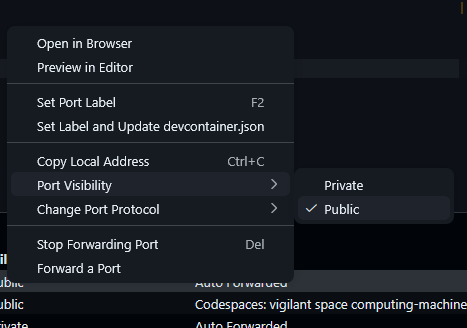
Check in your VS Code Port menu if the ports 4200,1031 are declared as public. If not, switch them from private to public.
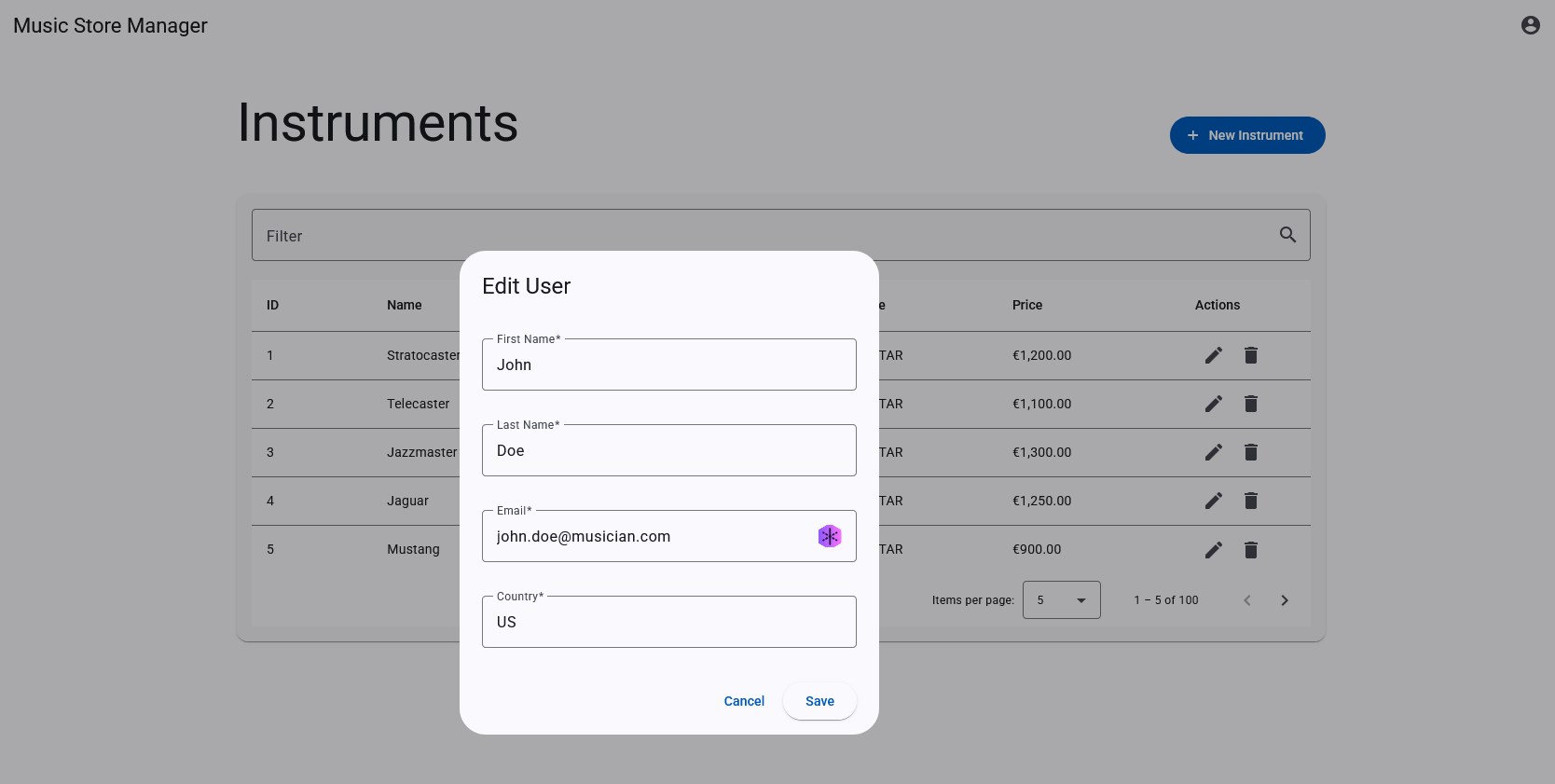
✅ Open the application in your browser. Change your user email (e.g. to test@musician.com) and country (e.g. to UK) via the user settings. The page will reload and you should see the discount banner appear based on your targeting rules!
Event Management
ℹ️ Go Feature Flag's web provider offers real-time updates. By listening to provider events, we can dynamically update the UI state when a feature flag is modified on the server without requiring a page refresh.
Currently, you must wait for a page reload to see changes if a feature flag is modified on the backend or the user context is updated. Let's automatically update the banner when the provider's configuration is changed.
📝 In instrument-list.component.ts, update initFeatureFlags to add event handlers:
  private async initFeatureFlags() {
    const user = this.userService.getCurrentUser();
    if (!user) return;

    await this.featureFlagService.setContext(user.email, user.country);

    this.showDiscountBanner.set(this.featureFlagService.isDiscountEnabled());

    this.featureFlagService.onConfigurationChanged((eventDetails) => {
      console.log('OpenFeature Provider Configuration Changed:', eventDetails);
      this.showDiscountBanner.set(this.featureFlagService.isDiscountEnabled());
      // Reload data to reflect the backend changes (prices)
      this.instrumentsResource.reload();
    });

    this.featureFlagService.onContextChanged((eventDetails) => {
      console.log('OpenFeature Provider Context Changed:', eventDetails);
      this.showDiscountBanner.set(this.featureFlagService.isDiscountEnabled());
      // Reload data to reflect the backend changes (prices)
      this.instrumentsResource.reload();
    });
  }
Testing Events
🛠️ To test it, keep your browser open and modify the api/src/main/docker/go-feature-flag/canary-flags.yaml file (or whichever flag file your proxy is currently using). For instance, change the clientEmail targeting suffix from musician.com to producer.com.
👀 Without refreshing the page, your browser's UI should automatically update! If you open your browser's Developer Tools console, you might see log messages like:
OpenFeature Provider Configuration Changed:
Object { message: "flag configuration have changed", flagsChanged: (1) […], clientName: undefined, domain: undefined, providerName: "_GoFeatureFlagWebProvider" }